Every time data moves from one system to another, someone has to decide where each piece of data belongs on the other side. That decision process is data mapping, and it sits underneath nearly every data integration, data migration, and data transformation project a company runs. Get data mapping right and data flows cleanly between systems; get it wrong and your data quality problem takes months to unwind.
This guide covers what data mapping is, how the data mapping process works, the data mapping techniques and tools teams use to build a data map, and how automation is changing how fast organizations move data between systems.
What Is Data Mapping?
Data mapping is the process of matching data fields from one data source to the corresponding data fields in a target system, so data created in one format can be understood and used correctly in another data environment. A data map is the documented result: field-by-field instructions telling an integration, an ETL job, or an application how source data becomes target data.
At its simplest, data mapping answers one question repeatedly: where does this piece of data go, and does it need to change shape to get there? A customer's first and last name in a CRM might need to become a single "FullName" field in an ERP. A date in MM/DD/YYYY in one source might need to become YYYY-MM-DD in the target. A status code of "1" might need to translate to "Active." Each decision is a mapping rule, and the full set of rules for a given data integration is the data map.
Data mapping shows up wherever data changes hands: application integration, data migration, EDI transactions, data warehouse loads, and API-driven data exchange. Whenever a source and a target don't share an identical schema (which is almost always), data mapping is the work that makes the two data sides compatible.
Source, Target, and the Rules in Between
Every data mapping exercise has three parts: a data source, a target, and the data rules that connect them.
The source is the system or file that originates the data such as a CRM, an ERP, a flat file, a partner's EDI feed. The target is the destination: a data warehouse, a new application, or a trading partner's system. Between the two sits the mapping logic which are the data rules governing how each source field relates to each target field.
Those data rules can be a simple one-to-one field match, or they can involve data transformation: combining two source fields into one target field, splitting a source field into several, converting units or currencies, applying conditional logic, or looking values up against a reference table. A mature data map also documents exceptions, which is what happens when a required target field has no matching source data.
Because a data map describes a relationship between one source and one target, most organizations maintain dozens or hundreds of individual maps: one per trading partner, one per integration, one per migration project. Multiply that by every schema change on either side, and it's easy to see why data mapping, done manually, becomes one of the most time-consuming parts of an integration effort.
Data Mapping vs. Data Integration, Transformation, and Migration
These terms get used interchangeably, but they describe different things.
Data integration is the broader discipline of connecting systems so data can flow between them, which includes data mapping as one of its core data components. Data mapping is the logic layer inside an integration; integration is the full data pipeline that logic runs inside of.
Data transformation is the work of converting data from its source shape into its target shape. A data map is the specification for a transformation; the transformation is what happens when it runs against real data.
Data migration is a specific use case for data mapping: moving data from one system to another, typically a one-time project such as replacing a legacy ERP. Data mapping in a migration project defines how every source record should land in the new target system.
ETL — extract, transform, load — is a technical process built around data mapping. Data is extracted from a source, transformed according to mapping rules, and loaded into a target, usually a data warehouse.
In short: data mapping is the rulebook, transformation is the execution of the rules, integration is the ongoing pipeline, and migration is a project type that leans on both.
Why Data Mapping Matters
Data Quality, Accuracy, and Governance
A data map is only as good as its accuracy, and that accuracy determines the accuracy of every downstream data output. If a mapping rule matches a source data field to the wrong target field, or misses a needed data transformation, every data record flowing through inherits the error. At scale, one mistake can corrupt thousands of data records before anyone notices.
Good data mapping is also an important part of data management and governance. A well-documented data map creates a data audit trail showing how a value in the target relates back to its source, which matters for compliance and data lineage. When someone asks why a report shows the wrong number, a clear data map is often the fastest way to trace the answer back.
What Goes Wrong Without a Data Map
Skipping data mapping produces the same data failures everywhere: fields that silently drop, transformations guessed rather than specified, duplicate or missing data records after a migration, and integrations that break when a source changes its schema. Without a documented data map, these failures are hard to diagnose as there's no source of truth for what the mapping was supposed to do. The cost compounds: a broken mapping in a partner integration can affect every transaction until someone fixes the rule.
How the Data Mapping Process Works
A reliable data mapping process generally follows five stages, whether it's done manually, with a mapping tool, or through automation.
1. Identify the Data Sources and Target System
The first step in any data mapping process is understanding both ends of the relationship: the data source such as a database, a flat file, an API, an EDI document, and the target, such as a data warehouse, an application, a partner system. What does the schema look like on each side? This step also covers data volume and any constraints the source or target places on the data.
2. Standardize and Document the Fields
Before mapping logic gets written, source and target data fields need to be inventoried and standardized: every field, its data type, and any naming convention attached to it. A field called "Cust_ID" on the source and "CustomerNumber" on the target might represent the same concept, but someone has to document that relationship before it becomes a mapping rule — often in a data dictionary.
3. Define the Transformation Rules
This is the core of the data mapping process: writing the rules that connect source data fields to target data fields. Simple one-to-one mappings get documented as direct field matches. Everything else like format conversions, concatenation, conditional logic, default values, lookups, becomes an explicit transformation rule.
4. Test the Mapped Logic
A data map should never go live without validation. Testing means running real or representative sample data through the mapping and checking the output data field by field. Good testing catches edge cases easy to miss on paper: null values, unexpected formats, and fields where source data doesn't exist, which are far cheaper to catch before the mapping touches a live process.
5. Deploy, Monitor, and Maintain
Once a data mapping is validated, it moves into production as part of a broader integration process. But the work doesn't stop at deployment as the source and target schemas change over time. An effective data mapping process includes ongoing monitoring so schema changes are caught early, plus a maintenance plan for updating mapping rules as systems evolve.
Data Mapping Techniques
There are three broad data mapping techniques, and most organizations use a combination depending on the complexity of the project.
Manual Data Mapping
Manual data mapping means a developer reviews the source and target schemas and writes the mapping logic by hand, often in code such as XSLT or SQL. It offers full control for unusual source-to-target relationships, but it's slow and doesn't scale across dozens of partner integrations.
Semi-Automated Data Mapping
Semi-automated data mapping uses a mapping tool with a visual interface, letting users connect source fields to target fields and apply built-in transformation functions that generate the code automatically. This opens data mapping to users who understand the business logic but aren't developers.
AI-Assisted and Automated Data Mapping
The newest techniques use AI to suggest or fully build a data map from plain-language descriptions or by analyzing source and target schemas directly. An AI-assisted mapping tool can propose matches from field names and patterns learned from prior mappings, flag ambiguous fields for review, and, in advanced implementations, build the entire data map end-to-end while a person validates it.
Data Mapping Examples
Data Migration Between Systems
A common data mapping example is a legacy system replacement: a company retiring an old ERP and moving customer, order, and inventory data into a new platform. Every field in the old system maps to its nearest equivalent in the new one, with transformation rules handling differences in data types and structure. Because migration projects usually have a hard cutover date, the data map must be complete and tested before the old system is switched off.
ETL and Data Warehouse Loads
In an ETL process, data mapping defines how data extracted from source systems is transformed and loaded into a data warehouse. These mappings often involve heavy transformation: aggregating data from multiple sources and applying rules that turn raw source data into the clean format analysts expect. Because ETL jobs run on a schedule against changing source data, the data map needs to stay accurate over time.
EDI and Partner Onboarding
Every new trading partner in an EDI relationship requires its own data mapping, translating a partner's document format such as an 850 purchase order into the company's internal format, and back again for outbound documents. This mapping is repetitive in structure but different in the fine detail of each implementation, which is why a faster, automated mapping process translates directly into faster partner onboarding.
Common Data Mapping Challenges
Schema Drift and Changing Formats
Source and target systems change. A source adds a new field, a target retires an old one, or a partner updates its document spec. Any of these can break an existing data map if it isn't caught. Schema drift is one of the most persistent data mapping challenges because a data map accurate at launch can silently go stale months later.
Manual Effort and Developer Dependency
Traditional data mapping techniques depend on specialized technical skill, so every new mapping waits in a developer's queue. This slows partner onboarding and turns data mapping into a bottleneck rather than a task business teams can handle themselves.
Scale, Volume, and Data Diversity
Large organizations don't run one data mapping project, they run hundreds, spread across different source systems, formats, and target applications. Maintaining accuracy across that much data, using manual or semi-automated techniques alone, gets harder as integrations grow.
Manual mapping breaking every time a partner updates their schema? See how Adeptia's AI Mapping agent builds and validates source-to-target maps in minutes.
Data Mapping Best Practices
A few best practices show up consistently across successful data mapping projects, regardless of tools used.
Start with a complete inventory of source and target fields before writing mapping logic — mapping against an incomplete schema guarantees rework later. Document every transformation rule so the data map stays understandable to someone other than its builder. Build a reusable data mapping template for common scenarios, such as a standard EDI document type. Validate with real or representative data before deployment. Treat the data map as a living document: schedule regular reviews so schema changes get caught before they cause a failure. And involve the business users who understand what the data means, not just the developers who move it.
Data Mapping Tools and Software: What to Look For
Data mapping tools and software vary widely in capability, but a few things separate tools that scale from ones that become their own bottleneck.
Look for a visual interface that lets technical and non-technical users build and review a data map, rather than requiring hand-written code for every rule. Look for a broad library of built-in transformation functions so common needs don't require custom scripting. Look for native connectivity to the source and target systems you use, since software requiring custom connectors adds hidden work. Look for built-in testing, so a mapping can be checked against real data before it goes live. And look for AI-assisted mapping tools that can generate mapping logic from a description, which is where the biggest cut in manual data mapping time is coming from.
What a Data Mapping Template Should Cover
A good data mapping template such as a spreadsheet or a structure inside a mapping tool, should capture: the source field name, type, and format; the target field name, type, and format; the transformation rule connecting them; and notes on exceptions, such as missing required source data. Templates matter most for repetitive mapping work, like EDI partner onboarding, where the same structure gets reused each time.
Automating Data Mapping with Adeptia
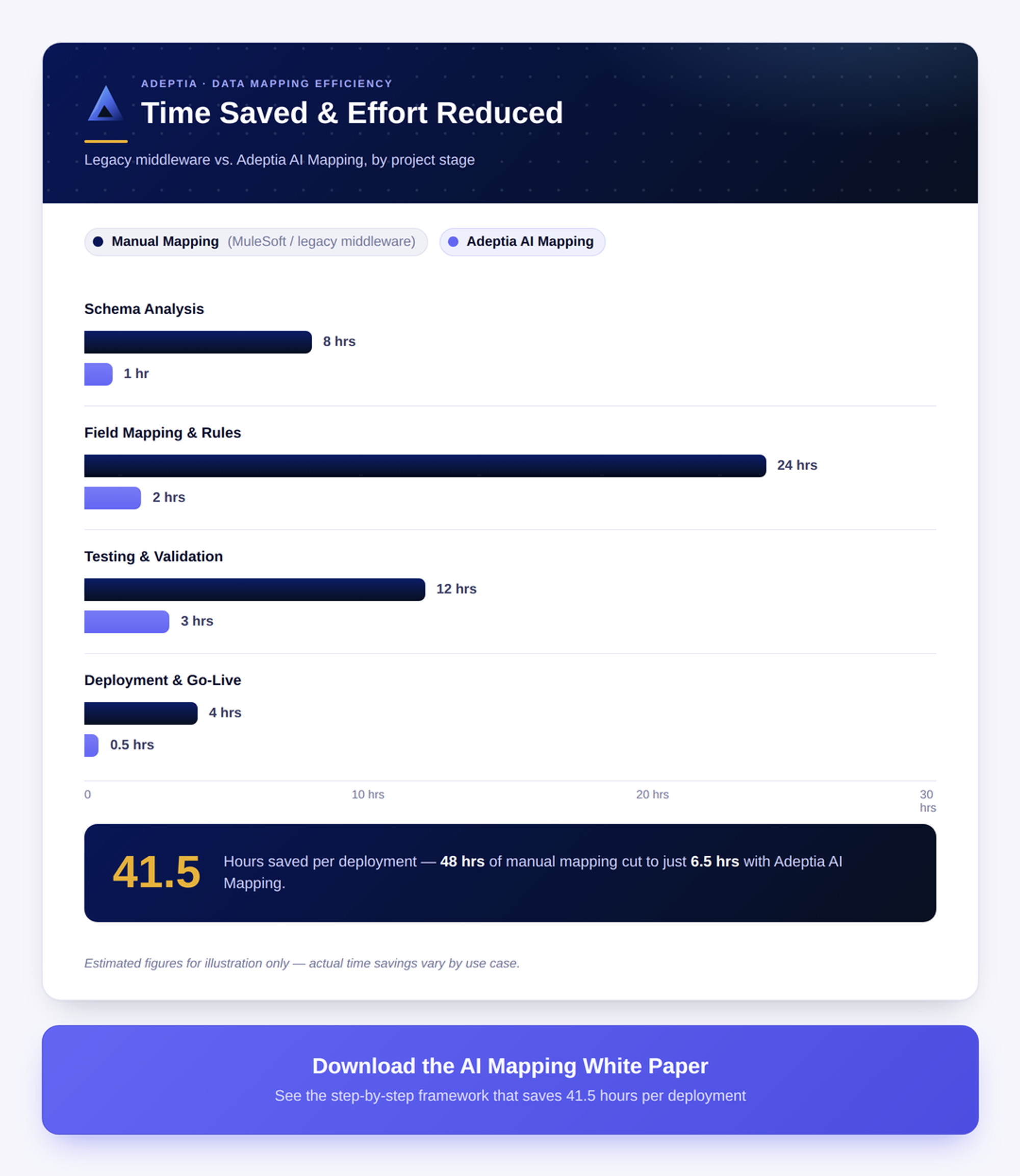
Adeptia Automate 5.3 introduces an AI Mapping agent that builds source-to-target data mappings from plain-language descriptions instead of manual field-by-field configuration. A user describes the data mapping needed, and the agent builds it, asking clarifying questions and drawing on more than 20 years of Adeptia's data integration expertise, plus a knowledge base built from an organization's own prior data mappings. What used to take a specialist weeks now typically takes minutes.
Every data mapping built with the agent can be validated before it's published: real or sample data can run through the entire mapping, or down to a single field, so the output data is visible before it touches a live process. The agent also gets smarter with every mapping it builds, as each mapping adds to two working knowledge bases, so an organization's hundredth data mapping benefits from everything learned building the previous ninety-nine.
Because the agent runs at design time only, published data mappings execute as compiled, native code with zero runtime AI cost or added latency. The agent is also MCP-enabled, so an organization's own AI agents can drive the same data mapping process end-to-end.
This changes who can do data mapping. Business users who previously depended on engineering can now build a working data map directly, while the generated code stays fully visible and editable for technical users. It runs on the model of an organization's choice — Anthropic, OpenAI, Azure OpenAI, or AWS Bedrock — with every customer's data knowledge base isolated and self-hostable.
For a company managing dozens of trading partners or a large data migration, the effect is speed: data mapping work that sat in a backlog for weeks moves to a validated, production-ready data mapping in minutes, without sacrificing the accuracy or governance a good data map depends on.
See It on Your Own Data Mappings
The fastest way to understand what an AI mapping agent can do is to point it at a mapping you'd normally hand to a specialist. Talk to the Adeptia team about a live demo of AI Mapping in Automate 5.3, and see how long your next data mapping actually takes.